TOD, POD & Beneficiaries: Tools to Avoid Probate
You’ve created a will. You might even have a trust. But if you want to keep your estate out of court and make life easier for your family, there’s one more set of tools you need to know about:
Transfer on Death (TOD) and Payable on Death (POD) designations.
These powerful (and often free) tools help you pass property, money, and investments directly to your loved ones—without the delays or costs of probate. And during Make-a-Will Month, they’re an essential part of completing your legacy plan.
What Are TOD and POD Accounts?
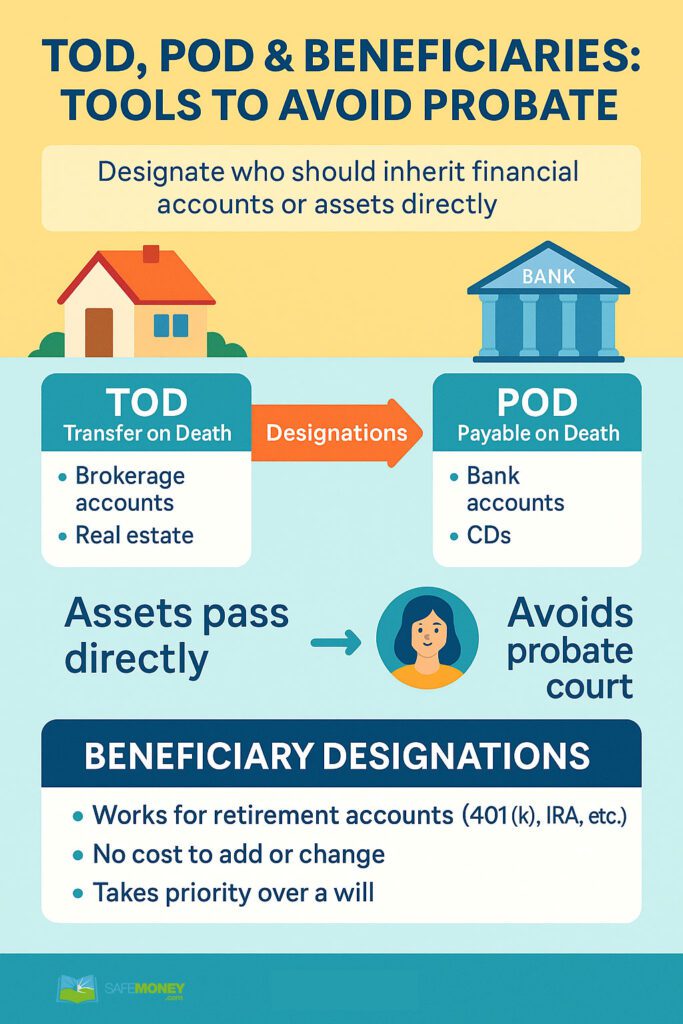
TOD and POD are simple legal instructions you can add to certain financial accounts or assets. They tell your financial institution who should receive the asset when you pass away.
TOD – Transfer on Death
Used for:
- Stocks
- Bonds
- Brokerage and investment accounts
- Real estate (in some states)
POD – Payable on Death
Used for:
- Bank accounts (checking, savings, CDs)
- Credit union accounts
- Money market accounts
How TOD and POD Designations Work
Let’s say you have a brokerage account worth $100,000 and you name your daughter as the TOD beneficiary. When you pass away, that account automatically transfers to her—without court involvement.
The same applies for a POD bank account. If your son is listed as the POD recipient on your savings account, the bank will release the funds to him directly.
 These designations bypass your will and go directly to the person named on file. No probate, no delay, no extra fees.
What Happens Without TOD or POD?
Without these designations:
-
- The asset becomes part of your probate estate
- Your family must wait for the court to authorize the transfer
- Legal fees and delays can reduce what your loved ones receive
Do TOD and POD Replace a Will or Trust?
No—but they complement your will or trust.
Your will outlines how to divide your probate assets. Your trust can help manage more complex situations like blended families, ongoing care needs, or property in multiple states.
TOD and POD designations are best for accounts that don’t need complicated instructions—just a clear, direct transfer to someone you trust.
Benefits of Using TOD and POD
- Avoid probate on designated accounts
- Fast access to funds for your loved ones
- No legal cost to set up in most cases
- Flexibility to change beneficiaries at any time
- Privacy—these transfers don’t become part of the public court record
Common Mistakes to Avoid
- Forgetting to name a contingent beneficiary. If your primary beneficiary passes away and no backup is listed, the asset goes to probate.
- Outdated designations. Life changes (like divorce, death, or estrangement) can create unintended transfers.
- Not coordinating with your will or trust. Your estate documents and beneficiary designations must align to avoid conflict.
- Assuming your spouse is automatically included. Some accounts won’t transfer unless a spouse is officially listed.
Real-Life Example: A Simple Move, Big Savings
George, a retiree, had three accounts—two bank accounts and one brokerage account. He added POD and TOD designations to all three, naming his two children as beneficiaries.
When George passed away, his children accessed those funds in a matter of weeks—with no court, no probate, and no attorney fees. That simple paperwork saved thousands of dollars and months of legal stress.
Quick Comparison Chart
| Tool | Use For | Avoids Probate? | Cost to Set Up |
|---|---|---|---|
| Transfer on Death (TOD) | Investment & brokerage accounts | Yes | Usually free |
| Payable on Death (POD) | Bank accounts, CDs | Yes | Usually free |
| Will | All probate assets | No | Varies (legal fees) |
| Living Trust | Most major assets | Yes (if funded) | Moderate to high upfront |
Action Steps
- Check your accounts. Ask your bank and brokerage firms if you have POD/TOD options in place.
- Add or update beneficiaries. Include both primary and contingent recipients.
- Coordinate your designations with your will and trust to avoid conflicts.
- Review annually. Life changes should always trigger a review of your designations.
 Ask Yourself: Have I made it easy for my family to receive what I leave behind—or will they have to go through court?
If you’re not sure, TOD and POD designations are a great place to start.
Legacy Planning Is All About Simplicity
These simple forms could make the difference between a smooth transition and a legal headache. Combined with your will or trust, TOD and POD designations are some of the easiest and most powerful estate tools you can use.
 Coming Up Next:
Our next article reveals what can go wrong with DIY wills and estate plans—and why a little professional help can save your family from big problems later.
 Written by Brent Meyer, founder of SafeMoney.com. With more than 20 years of hands-on experience in annuities and retirement planning, Brent is committed to helping Americans make informed, confident financial decisions.
Disclaimer: This article is for educational purposes only and should not be considered legal or financial advice. Please consult a qualified professional to discuss your specific needs and circumstances.
The post TOD, POD & Beneficiaries: Tools to Avoid Probate first appeared on SafeMoney.com.
Featured Blogs
- Social Security Survivor Benefits Explained for Couples
- Don't Let Unexpected Retirement Expenses Catch You Off Guard
- Annuities: Embracing the 'Safe Growth' Trend
- Will Social Security Run Out? 2026 Update
- Life Insurance: The Income Bridge Many Couples Miss
- What Happens to Your Income When One of You Is Gone?
- A Paws-On Approach to Understanding Medicare Basics 🐾
- Love Isn’t Just a Feeling—It’s a Retirement Plan
- Understanding Fixed Index Annuities in Today's Market
- Secure Retirement Plans: Annuities & Longevity Strategies
- New Tools, Same Goals: How Retirement Planning Is Evolving 🐾
- Why Market Volatility Hits Retirees Harder Than Workers
- Annuities: Your Forever Treat Bowl in Retirement 🐾
- The Retirement Paycheck: How to Replace Your Salary in Retirement
- Secure Your Retirement with Safe Income Strategies
- 3 Biggest Retirement Income Mistakes After 50
- Why Retirement Income Matters More Than Account Savings
- What Financial Awareness Really Means in Retirement
- Having Savings Isn’t the Same as Having a Plan
- The Secret to Retirement Confidence Is Structure, Not Luck
- What Retirees Should Review Before the New Year
- Preparing Your Retirement Income for the Year Ahead
- 🎾 Fetch Calm, Not Chaos: Keeping Retirement Income Steady
- Missed Medicare Open Enrollment? What Retirees Can Do Now
- Missed Medicare Open Enrollment? What Retirees Can Do Now
- game
- potatoes
- Staying Calm in December Markets: A Bulldog’s Guide to Balance
- Why December Is Ideal for Securing Lifetime Income
- December Medicare Checkup: What to Review Before Jan 1
- 5 Year-End Retirement Blind Spots to Avoid in 2025
- Your December Retirement Checkup Guide
- Black Friday Savings Tips Retirees Can Use This Holiday
- The Retirement Spending Smile Explained
- A Thanksgiving Lesson in Gratitude, Guidance & Guaranteed Income
- Give Thanks, Then Revisit Your Retirement Plan
- blogging
- How to Build Financial Resilience in Uncertain Times
- Smart Charitable Giving Before Year-End
- Understanding RMDs: What Every Retiree Needs to Know Before Age 73
- The Retirement Income Gap: Will Your Money Last?
- The Psychology of Retirement: Aligning Money and Mindset
- The 3-Bucket Plan for Calm Cash Flow
- How to Stress-Test Your Retirement Plan
- Why a Year-End Portfolio Review Could Save Your Retirement
- 4 Retirement Myths That Can Cost You Big Time
- Is Your Medicare Specialist on the Calendar Yet?
- The Retirement Tax Trap: Moves to Make Before Year-End
- How to Use Catch-Up Contributions to Boost Your Retirement
- Why Retirement Financial Literacy Matters More Than Ever
- Why Guaranteed Lifetime Income Is Your Next Big Priority
- Your Year-End Financial Planning Checklist for 2026
- The Hidden Link Between Health Costs and Retirement Security
- The Hidden Link Between Health Costs and Retirement Security
- Tootsie Tuesday Starts Nov. 4—Stay Tuned!
- Keeping Your Financial Plan on Track After Retirement
- Medicare Open Enrollment Starts Today: What You Need to Know
- Protect What You’ve Built: Managing Risk in Retirement
- Protect What You’ve Built: Managing Risk in Retirement
- Turning Savings Into Income: Your Lifetime Paycheck Plan
- The Cost of Waiting: Don’t Delay Your Financial Plan
- How to Calculate Your Retirement Income Gap (Why It Matters)
- October Is National Financial Planning Awareness Month
- The Great Wealth Transfer: Baby Boomers Passing Trillions
- Permanent vs. Term Life Insurance: What’s the Difference?
- One Big Beautiful Bill: What Retirees Need to Know
- One Big Beautiful Bill: What Retirees Need to Know
- The Role of Life Insurance in a Comprehensive Retirement
- IUL Insurance Explained: Pros, Cons, and Misconceptions
- The Role of Life Insurance in Estate Planning
- Tax Advantages of Life Insurance You May Not Know
- Using Life Insurance to Protect Retirement Income
- 5 Life Insurance Myths That Could Cost Your Family
- Life Insurance vs. Annuities: Key Differences Explained
- How Much Life Insurance Do You Really Need?
- Life Insurance Awareness Month: Why It Matters in 2025
- What to Do After You’ve Made Your Will or Trust
- TOD, POD & Beneficiaries: Tools to Avoid Probate
- Passing Down More Than Money: Letters & Legacy Planning
- The Hidden Risks of DIY Wills and How to Avoid Them
- Probate Explained: What It Is and How to Avoid It
- Naming Beneficiaries: The Hidden Danger of Getting It Wrong
- Spotlight Series: Michael Dinich of Your Money Matters, Inc.
- From Retirement Ready to Legacy Ready: What Comes Next?
- What’s Your Retirement Goal—and Are You on Track?
- How Inflation Quietly Erodes Your Retirement Income
- Peace of Mind in Retirement Starts With a Plan
- Avoiding Retirement Surprises Most People Miss
- How Social Security Timing Impacts Retirement Income
- Smart Tax Moves That Boost Retirement Income Longevity
- Spotlight Series Interview with Paul R. Lowe
- Avoiding Market Risks in Retirement: Why It Matters
- How to Create a Retirement Paycheck That Lasts
- Blogg
- deployed the changes to staging
- Testing web blog publication
- blog checking
- test blog not creation issue in sub agents
- Here test
- Cluck Norris
- testing duplicate blog publisher issue
- Reproduce duplicate posting issue
- Testing long running worker
- testing web blog changes (Copy)
- testing with force unlock
- teting
- New capabilities to manage On-Demand Capacity Reservations
- Additional instance types supported for Credential Guard
- AMI deregistration protection
- Added Nitro performance considerations for enhanced networking
- Set IMDSv2 as the account default
- Tag new Linux AMIs created from a snapshot
- Tag new AMIs and snapshots when copying
- EC2 Instance Connect preinstalled on macOS AMIs
- EC2 Instance Connect support for CentOS, macOS, and RHEL
- Amazon Q EC2 instance type selector
- EC2 Free Tier
- Console-to-Code
- Configurable idle connection tracking timeouts
- VolumeStalledIOCheck metric
- PTP hardware clock
- Change instance type of instance enabled for hibernation
- Amazon Data Lifecycle Manager default policies
- Amazon EBS snapshot lock
- Instance topology
- Block public access for snapshots
- Amazon Data Lifecycle Manager pre and post scripts
- AWSDataLifecycleManagerSSMFullAccess AWS managed policy
- Capacity Blocks for ML
- Spot Instance hibernation
- Default settings for block public access for AMIs
- Amazon EC2 Global View
- Disable an AMI
- Attached EBS status checks
- Block public access to AMIs
- EC2 Instance Connect Endpoint
- IMDS Package Analyzer
- EC2 Serial Console bare metal instances
- Launch template quotas
- Capacity Reservation utilization notifications
- Amazon EBS performance updates
- Capacity Reservation groups
- Modify instance metadata options
- In-place macOS operating system updates
- UEFI preferred
- Fault testing on Amazon EBS
- AMI alias in launch templates
- Hibernation support for C6i, I3en, and M6i
- Torn write prevention
- ENA Express
- Recycle Bin retention rule lock
- Copy AMI tags
- AMI size for store and restore
- priceCapacityOptimized allocation strategy for Spot Instances
- price-capacity-optimized allocation strategy for Spot Instances
- Cancel having an AMI shared with your account
- Transfer Elastic IP addresses
- Replace root volume
- Automatically connect instance to database
- AMI quotas
- Configure AMI for IMDSv2
- Initiate Spot Instance interruption
- Verified AMI provider
- Placement groups on AWS Outposts
- Condition keys for Recycle Bin
- Dedicated Hosts on AWS Outposts
- Instance stop protection
- UEFI Secure Boot
- NitroTPM
- AMI state change events
- Describe public keys
- Create key pairs
- Mount Amazon FSx file systems at launch
- New launch instance wizard
- Automatically deprecate public AMIs
- AMI last launched time
- Additional RHEL platforms for Capacity Reservations
- Instance tags in instance metadata
- Capacity Reservations in cluster placement groups
- Recycle Bin for Amazon EBS snapshots
- Amazon EBS Snapshots Archive
- Spot Fleet launch-before-terminate
- EC2 Fleet launch-before-terminate
- Compare timestamps
- Share AMIs with organizations and OUs
- Spot placement score
- Attribute-based instance type selection for Spot Fleet
- Attribute-based instance type selection for EC2 Fleet
- On-Demand Capacity Reservation Fleet
- EC2 Fleet and targeted On-Demand Capacity Reservations
- T3 instances on Dedicated Hosts
- Hibernation support for RHEL, Fedora, and CentOS
- Amazon EC2 Global View
- AMI deprecation support for Amazon Data Lifecycle Manager
- Amazon EC2 key pairs
- CloudWatch metrics for Amazon Data Lifecycle Manager
- CloudTrail data events for EBS direct APIs
- Prefixes for network interfaces
- Event windows
- New Local Zones added
- Deprecate an AMI
- Capacity Reservations on AWS Outposts
- Root volume replacement
- Store and restore an AMI using S3
- EC2 Serial Console
- Boot modes
- Amazon EBS local snapshots on Outposts
- Create a reverse DNS record
- Amazon Data Lifecycle Manager
- Tag AMIs and snapshots on AMI creation
- io2 Block Express preview
- Throughput Optimized HDD and Cold HDD volume sizes
- Mac1 instances
- Use Amazon EventBridge to monitor Spot Fleet events
- Use Amazon EventBridge to monitor EC2 Fleet events
- Delete instant fleets
- Amazon EFS Quick Create
- EC2 instance rebalance recommendation
- Capacity Reservations in Wavelength Zones
- Capacity Rebalancing
- Spot Instance vCPU limits
- Capacity Reservations in Local Zones
- Amazon Data Lifecycle Manager
- Hibernation support for M5a and R5a
- Provisioned IOPS SSD (io2) volumes for Amazon EBS
- Instance metadata provides instance location and placement information
- Wavelength Zones
- Capacity Reservation groups
- Bring your own IPv6 addresses
- Launch instances using a Systems Manager parameter
- Customize scheduled event notifications
- Amazon Linux 2 Kernel Live Patching
- Amazon EBS Multi-Attach
- Stop and start a Spot Instance
- Connect to your instance using Session Manager
- Dedicated Hosts and host resource groups
- Dedicated Host sharing
- Default credit specification at the account level
- Instance type discovery
- Amazon EBS fast snapshot restores
- Instance Metadata Service Version 2
- Queued purchases of Reserved Instances
- Diagnostic interrupt
- Capacity optimized allocation strategy
- On-Demand Capacity Reservation sharing
- EC2 Instance Connect
- Host recovery
- Amazon EBS multi-volume snapshots
- Windows to Linux Replatforming Assistant for Microsoft SQL Server Databases
- Elastic Fabric Adapter
- Bare metal instances for M5, M5d, R5, R5d, and z1d